Independent software studio

Build Smarter.
Work Faster.

Practical software and intelligent automation tools for modern business workflows.

Small, useful software for real operational work.
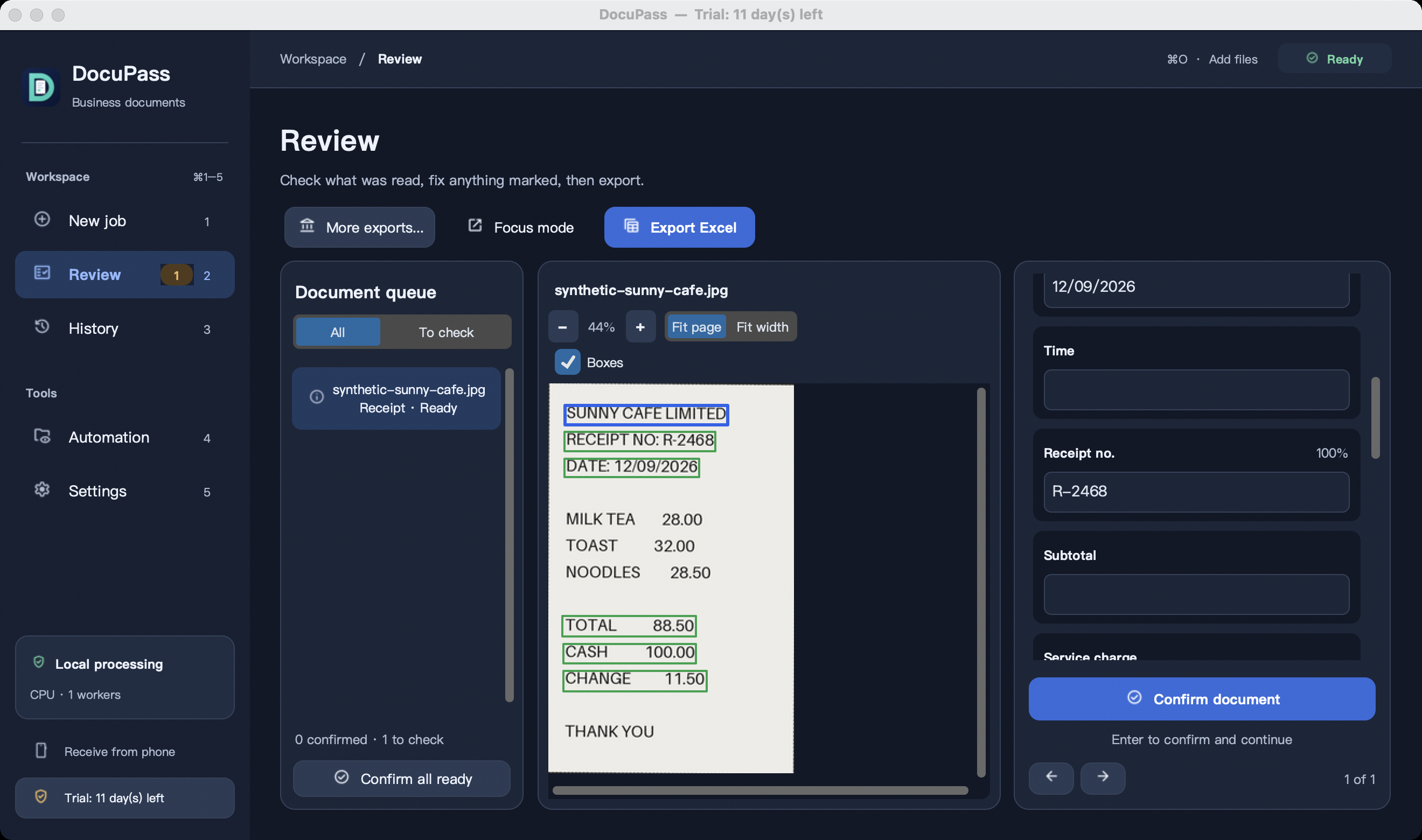
Actual local OCR result · synthetic receiptActual local OCR result · synthetic receipt

Featured project · DocuPass

From a scanned page to a result you can check.

See the actual local app reviewing a synthetic receipt, the extracted fields, and the evidence behind them. DocuPass also includes handwriting and form modes, with measured limits shown below.

Explore the full DocuPass case study
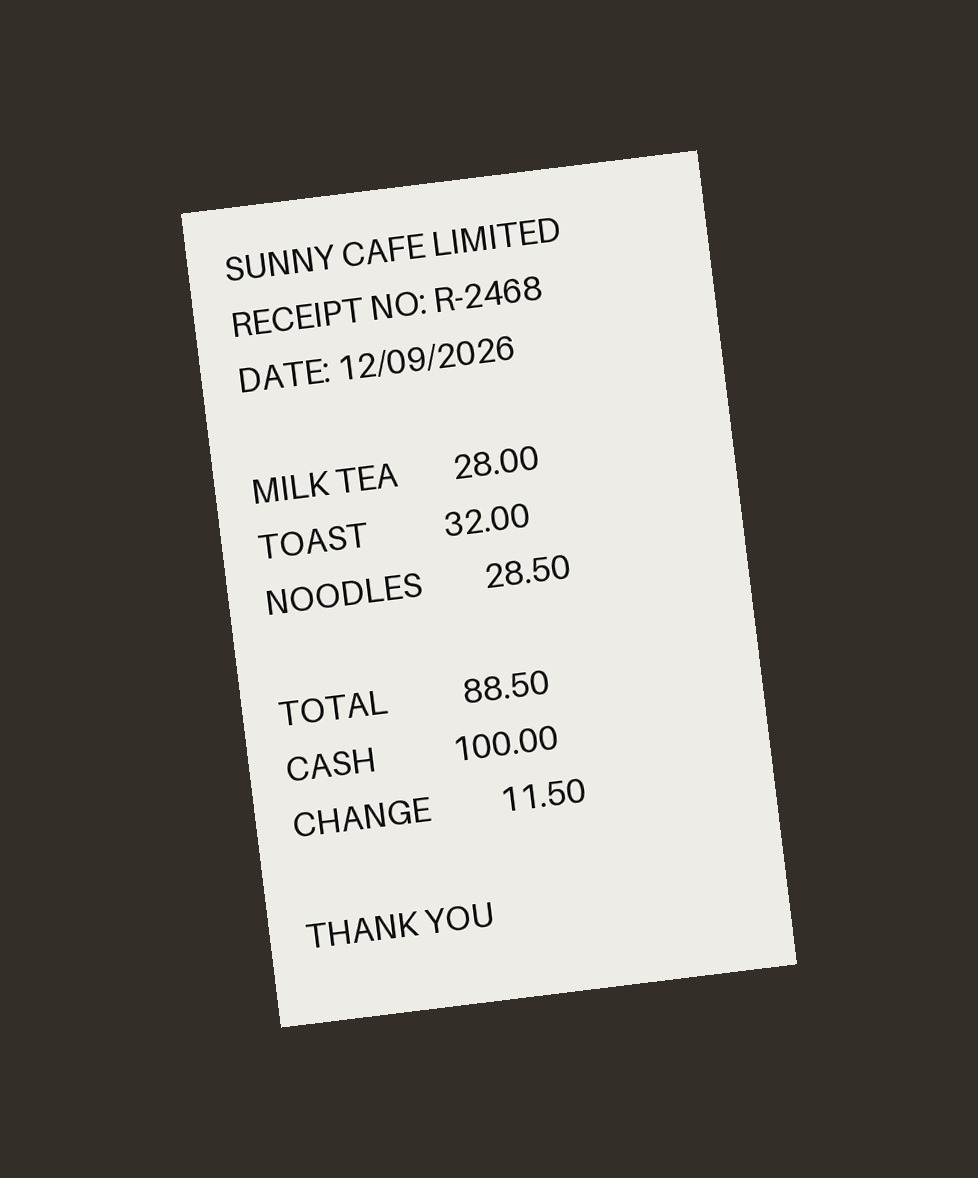
Actual local OCR result · synthetic receipt
Actual local OCR result · synthetic receiptSUNNY CAFE LIMITED88.50From sample scan to OCR result

Local applications

Software projects
in development.

Find a tool for your next task: document review, browser control, video production or creative play. Explore real screens and workflows, then discuss the project that fits your needs.

View all projects
Review a real OCR result: A real review workspace with a synthetic receipt, OCR boxes, a merchant field crop and a human confirmation step.DOCUPASS · REAL APP SCREENS
In Development

Desktop OCR · Hong Kong business documents

DocuPass

Turn document piles into records you can check.
  • Add your documents
  • Review extracted values
  • Export checked records
Explore project
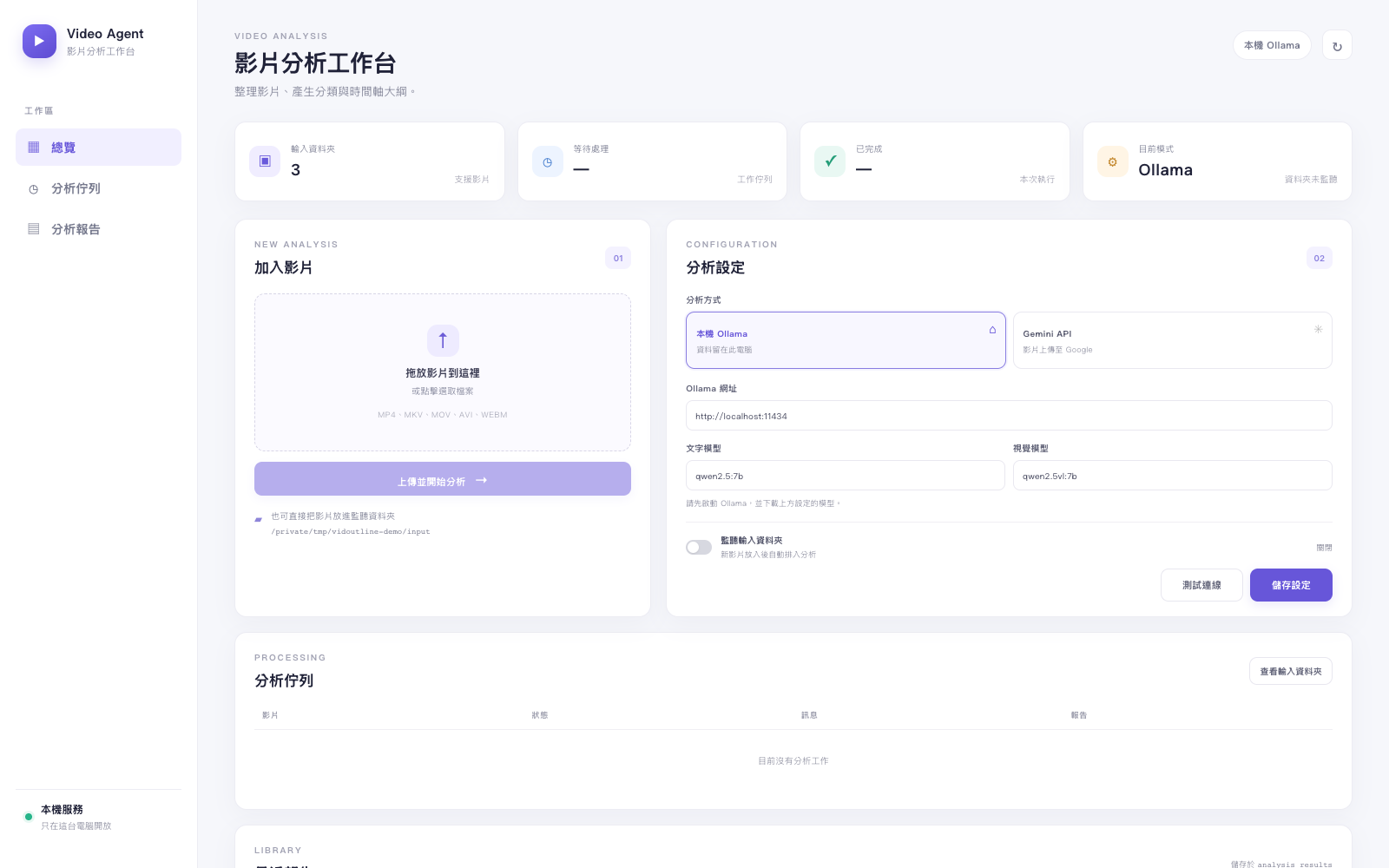
Screenshot of VidOutline's current Chinese-language local dashboard, showing local Ollama settings and sample input counts.VIDOUTLINE · APP SCREEN
In Development

Video · Local analysis

VidOutline

Turn long videos into notes you can use.
  • Choose a video
  • Analyse the content
  • Keep timestamped notes
Explore project
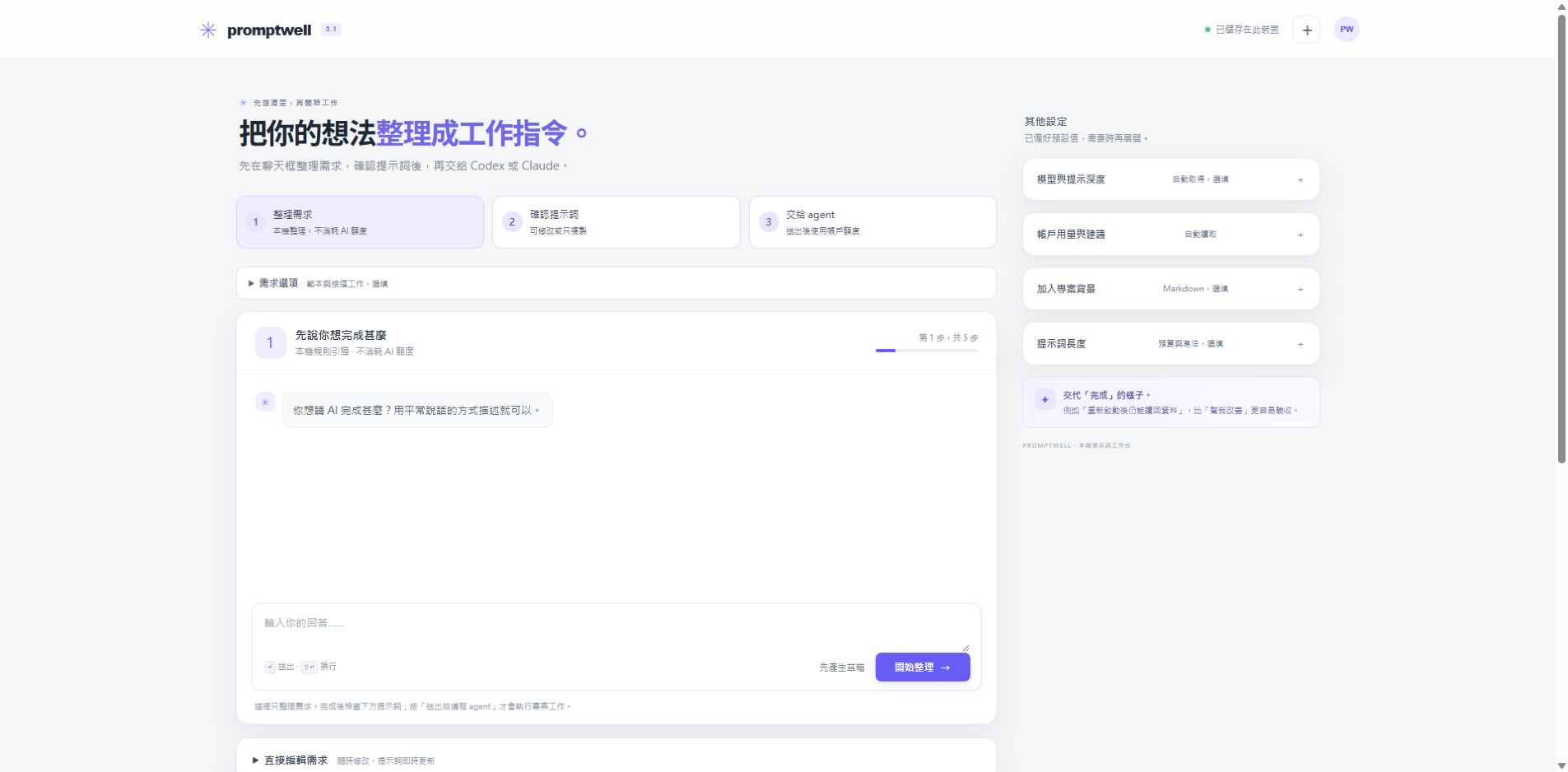
Prompt preparation workspace: The real Promptwell interface begins with local planning and optional settings. No AI task was executed for these captures.TOKENSAVER · Real app captures
In Development

Local tools · Prompt preparation

TokenSaver

Give your next AI task a clearer starting point.
  • Set the project context
  • Prepare the prompt
  • Keep useful versions
Explore project
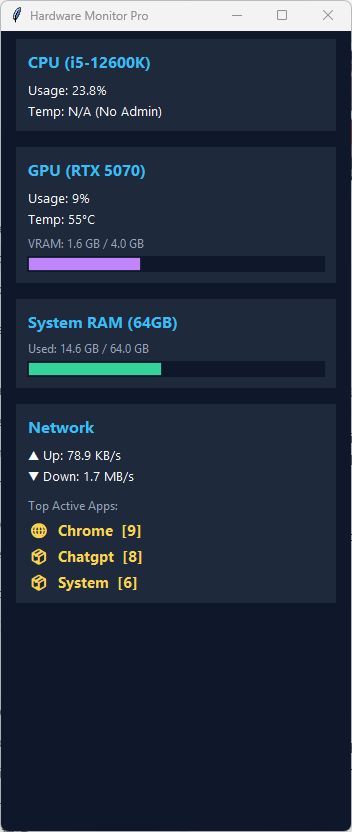
Live hardware dashboard: The real Windows window shows resource meters, temperature availability, network rates and active applications. Values are a snapshot of the capture computer.MONITOR · Real app captures
In Development

Windows · Hardware dashboard

Monitor

See what your computer is doing at a glance.
  • Open the panel
  • Watch resource usage
  • Inspect busy applications
Explore project
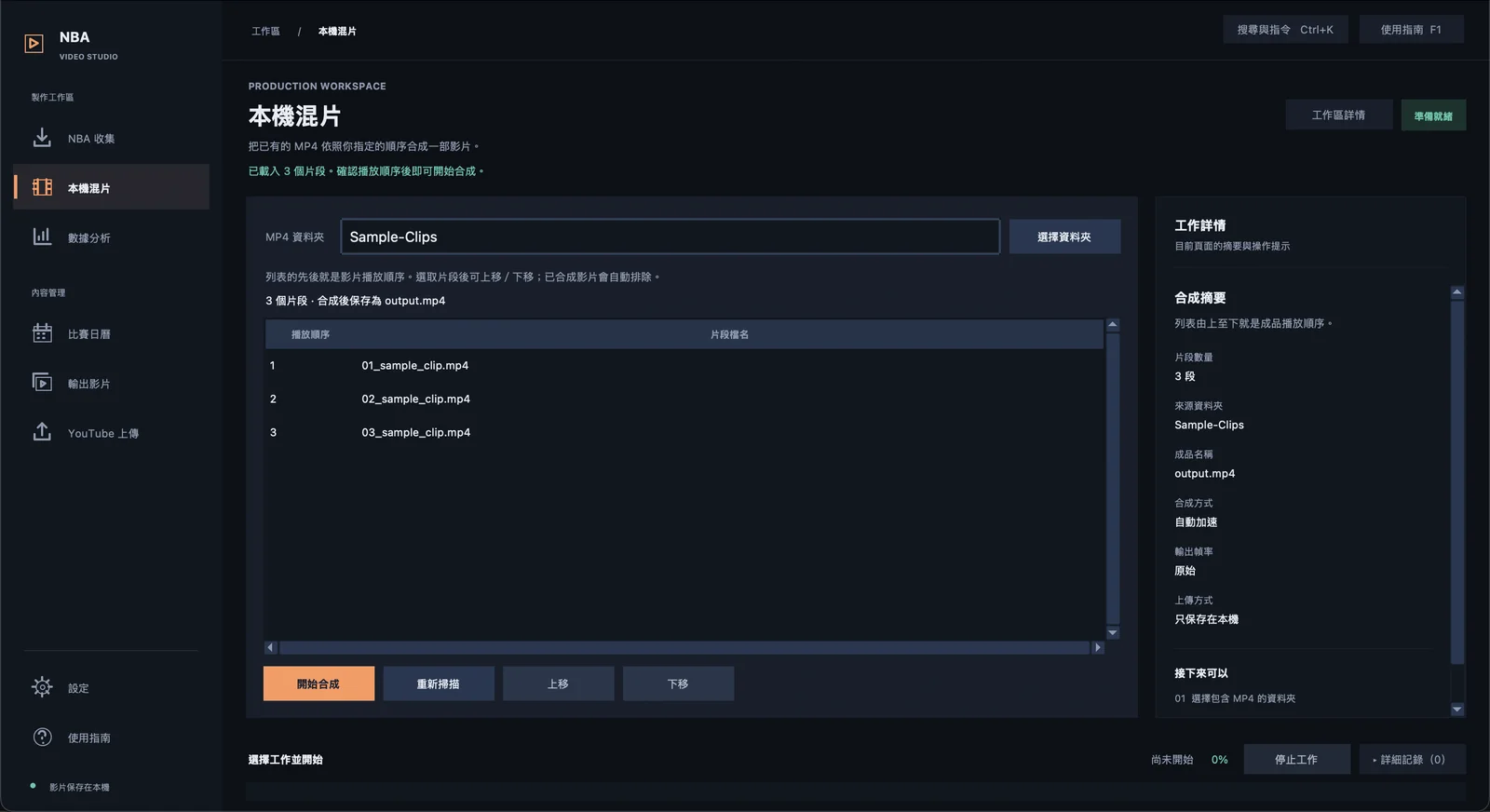
Local clip workspace: Three generated sample clips loaded in playback order, with merge method, output name and reorder controls.Real desktop UI · Synthetic sample media
In Development

Video automation · Python desktop

NBA Video Studio

Bring basketball highlights from clips to a finished edit.
  • Organise game clips
  • Frame and review Shorts
  • Prepare the final video
Explore project
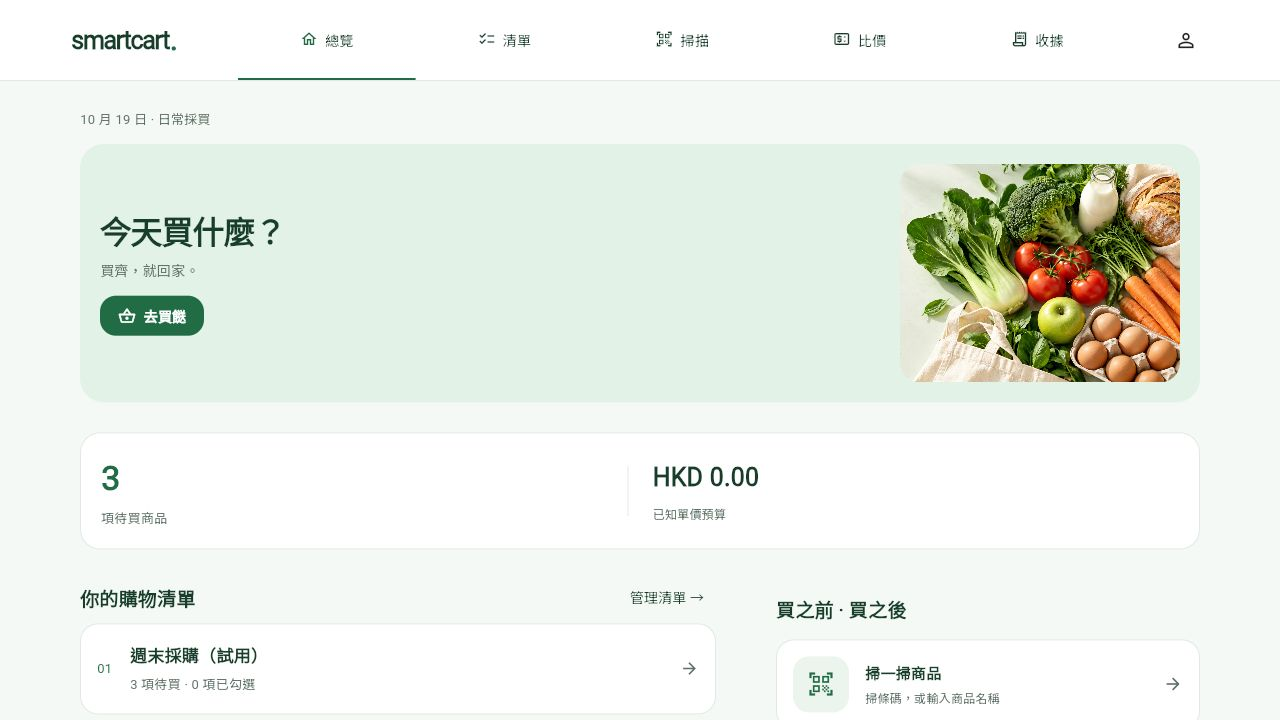
Grocery overview: The local desktop dashboard brings list progress and the known-price budget together. Its grocery artwork is decorative, not evidence of store inventory.Local app capture · Demo data
In Development

Grocery planning · Flutter & .NET

SmartCart AI

Keep the shopping list and price comparison together.
  • Make a list
  • Compare recorded prices
  • Use the shopping view
Explore project
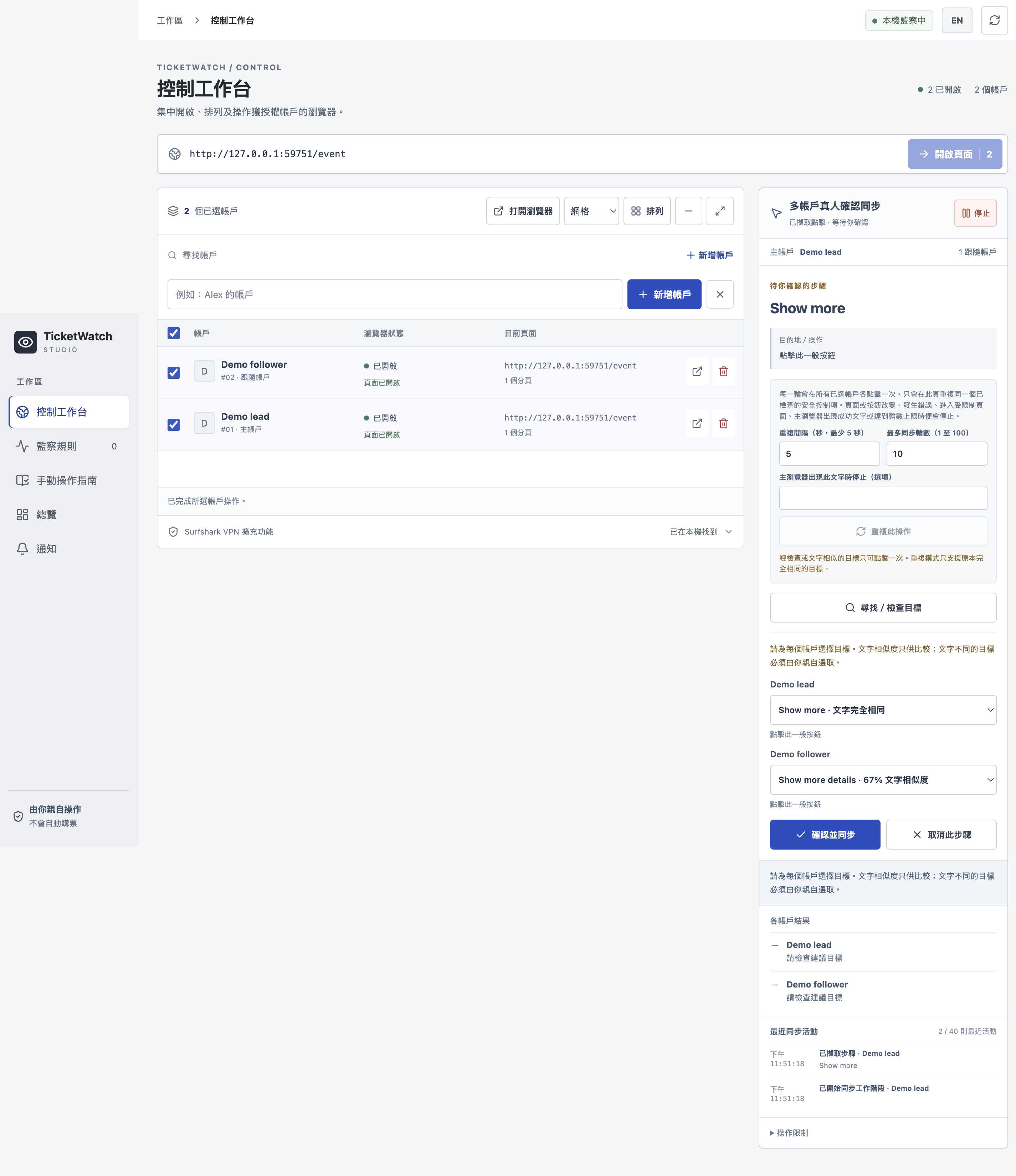
Review a pending action: Two fictional local demo profiles show a held action and the target-selection controls before confirmation.TicketWatch Studio · Desktop demo
In Development

Browser control · Electron desktop

Web Control Studio

Bring your browser sessions under one clear control desk.

  • Choose profiles
  • Open and arrange pages
  • Review the next action
Explore project

Selected projects

Games and independent
creative work.

Explore four game builds across basketball, property strategy, and music trivia, with detailed highlights and local captures.
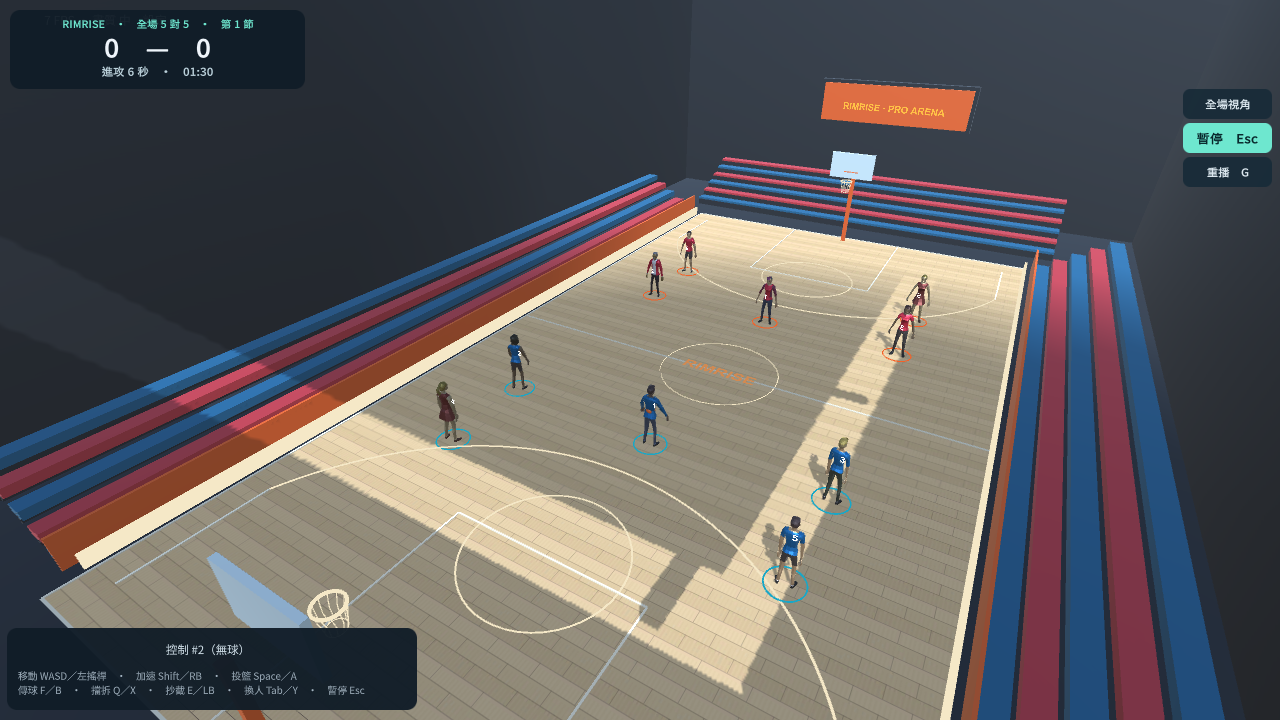
A full-court 5v5 match in progress, with the quarter, score, shot clock, team markers and control hints visible.UNITY 6.3 · CURRENT LOCAL BUILD
01
Basketball game · Unity prototypeUnity prototype · In development

RimRise · Unity edition

The current Unity 6.3 single-player build combines full-court 5v5 basketball, career progression and a larger 3D city with drivable vehicles and walk-in shops.
  • Full-court 5v5Play a complete 10-player game with AI teammates and opponents, four compressed quarters, a scoreboard, a 24-second shot clock, and overtime.
  • On-court controlsDribble, pass, shoot, drive for a layup or dunk, call a screen, steal, block, switch players, and compete for rebounds.
  • A city you can move throughExplore six procedural city styles, drive or cycle along the roads, enter shops and cafés, and manage housing, work and daily activities.
  • Unity 6.3
  • C#
Explore project
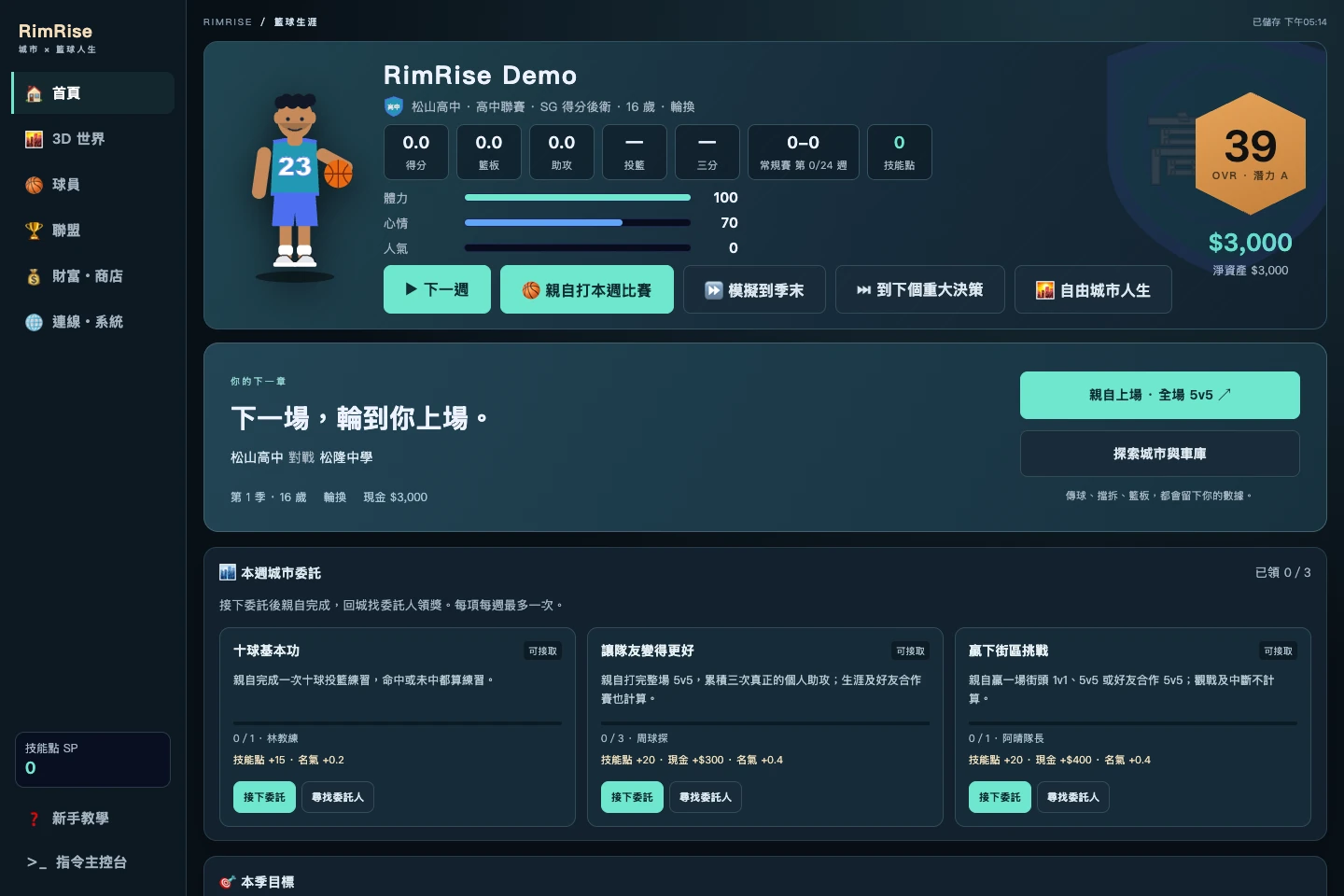
Career dashboard linking player and season stats to the next 5v5 game, free-city mode and trackable city commissions.BROWSER EDITION · SCREEN CAPTURE
02
Browser game · Web developmentBrowser game · In development

RimRise · Browser game

A browser basketball game with career progression and 3D city play.
  • WebGL graphics and GPU diagnosticsThree.js renders the 3D world through WebGL and requests a high-performance GPU. Graphics settings show the adapter and acceleration state, flag software rendering, and lower resolution and frame rate when needed.
  • Career and seasonsStart in high school, college, or a professional pathway; develop a player, move through weekly seasons and playoffs, and handle contracts, free agency, awards, and career decisions.
  • 5v5, street courts, and practicePlay the season's full-court 5v5 games, challenge street-court 1v1 and 5v5 matches, or work on shooting practice.
  • JavaScript
  • Three.js
  • WebGL
Explore project
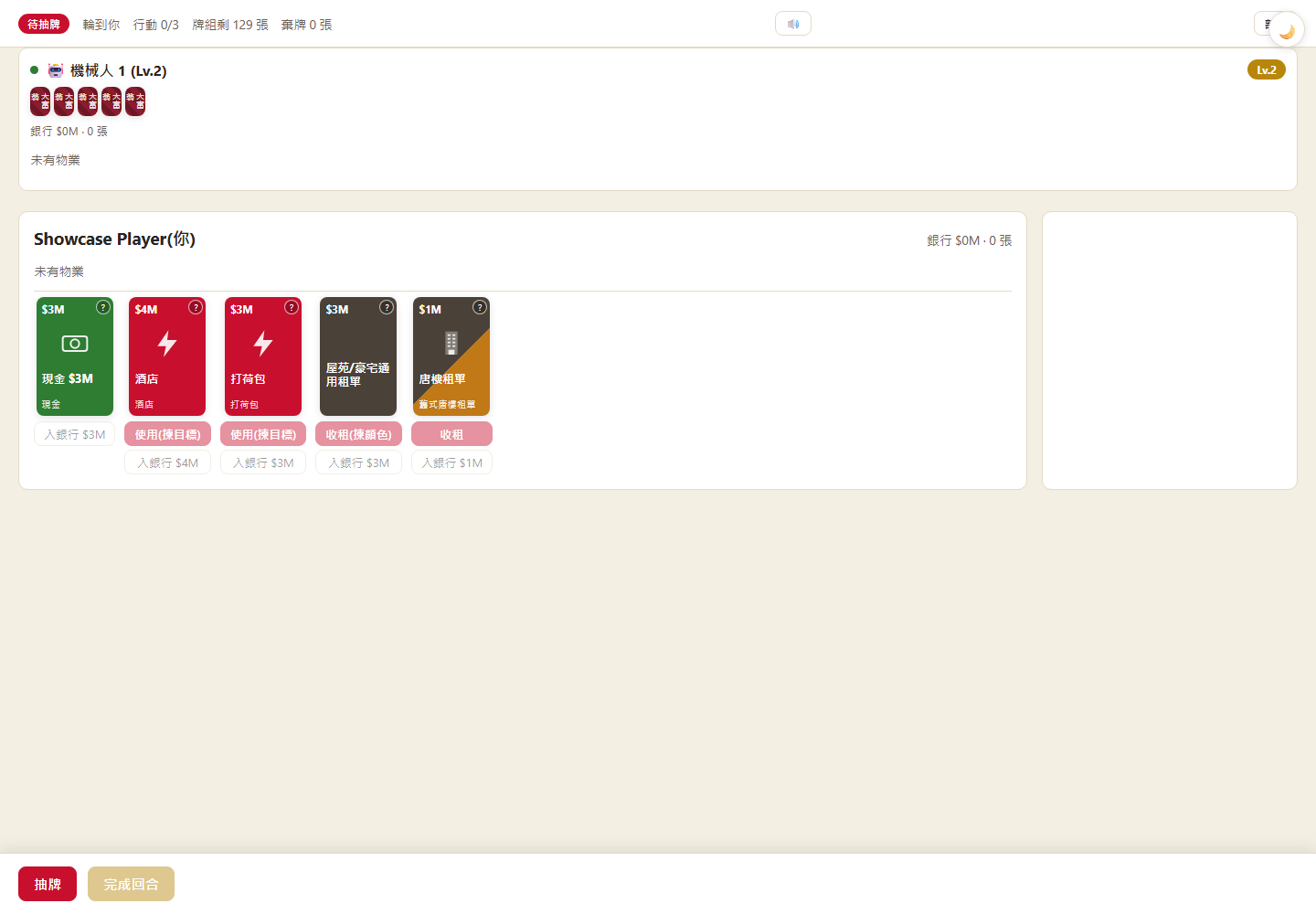
A local round in progress: review the opponent’s property and your five-card hand, then bank money, play an action card, draw, or end the turn.BIG DEAL HK · LOCAL SCREEN CAPTURE
03
Hong Kong card game · Multiplayer prototypeLocal prototype · In development

BigDeal HK

A Hong Kong-themed property card game with multiplayer rooms, bots, and changing events.
  • Classic property setsBuild complete property sets while managing bank cash, rent and action cards; the first player to complete three sets wins.
  • Battle RoyaleRent and payment demands are doubled. A player who cannot pay is eliminated, and the last player remaining wins.
  • Syndicate 2v2 teamsFour players form two teams, can pass cards to a teammate, and combine property sets toward a shared four-set win.
  • TypeScript
  • React
  • Socket.IO
Explore project
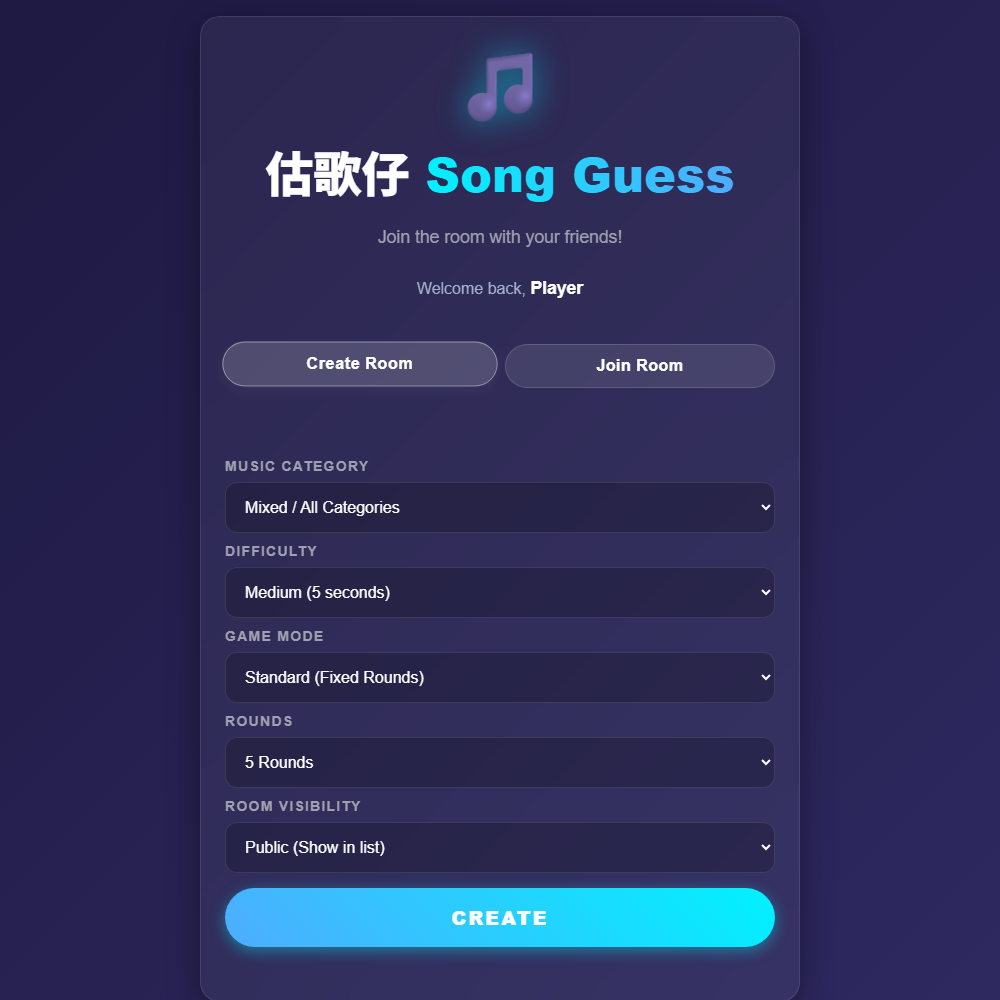
Room setup controls the music category, answer time, quiz mode, round count, and public or private visibility before you create a room.SONG GUESS · LOCAL SCREEN PREVIEW
04
Music trivia · Multiplayer gameLocal prototype · In development

Song Guess Online

A multiplayer music quiz with timed rounds, configurable rooms, and team modes.

  • Seven quiz modesPlay fixed rounds, survival elimination, fastest-answer scoring, next-song clues, next-lyric rounds, a 1v1 tournament, or red-versus-blue team play.
  • Difficulty and round settingsSet the answer timer to 10, 5 or 1 second; standard matches offer 5, 10, 20 or 30 rounds, while elimination uses starting hearts.
  • Music categories and playlistsChoose a music category, or connect Spotify in settings to select a playlist for a room.
  • JavaScript
  • Socket.IO
Explore project

DocuPass · Local document processing

From a scan
to a checked export.

These diagrams explain the desktop flow and companion-phone handoff. The showcase above includes a live capture from the working desktop app.

Explore DocuPass
DocuPass · local OCRDOCUPASS · SOURCE-BASED FLOW
Choose files and pagesAdd images, PDFs or folders; select the PDF pages and document mode to process.01
Check hardware and modelSelect language and model tier. The app checks CPU, memory and supported NVIDIA runtime before recommending parallel workers.02
Run local OCRProcess files in parallel with live progress and an estimate; failed files are reported without stopping the rest of the batch.03
Review the fieldsCompare values with the original page, correct uncertain results, and inspect duplicates or arithmetic checks.04
Export the recordsSave JSON, CSV or Excel, including document-specific sheets and accounting-ready outputs.05

DocuPass runs OCR on the desktop. NVIDIA GPU mode needs a compatible Windows setup; macOS uses CPU. The GPU path still needs real-device verification.

How we think about software

Built around the real work.

Useful tools should feel understandable, fit the way people work, and earn trust one step at a time.

01

Privacy-conscious by design

Keep data handling deliberate, minimize collection, and make deployment choices clear.

02

Human review where it matters

Treat validation and human oversight as part of a dependable workflow.

03

Modular and integration-friendly

Shape small, understandable tools that can fit into existing operations over time.

04

AI-assisted development

Coding agents support exploration and implementation; the founder reviews and tests changes before release.

About Zevqio

An independent studio, working on useful things.

Zevqio is an independent, founder-led software studio, bootstrapped and in an early stage. It explores practical tools for document processing, automation, and business productivity.

Current game work includes RimRise in browser and Unity versions, BigDeal HK, and Song Guess Online. These independent game projects are in development, and each project page describes its current build and stage.

Founder-led · Bootstrapped · Early-stage

More about Zevqio

Start a conversation

Let’s build something useful.

Have a workflow worth making simpler? Tell us what you’re working on.

founder@zevqio.site